Establishing Transfers between FAIRWINDS Accounts and External Accounts

Transfer From Another Financial on the FAIRWINDS App
Sign in to the FAIRWINDS mobile app.
Select the More tab on the bottom right .
Navigate to the Move Money section.
Select Transfer Between Financials.
Once selected, you’ll be taken to a screen where you can begin setting up your accounts to transfer funds between financial institutions. You must validate your email address before you can transfer funds.
Select your From and To accounts, enter the amount you would like to send, the send date, and frequency. You also have the option to add a memo.
To add a new account , select the Add a New Account link and input the required information. Note: You must be an owner on the account(s) you are adding.
Transfer From Another Financial Online
Sign in to your FAIRWINDS account online.
Hover over Move Money from the top menu bar.
Select Transfer Between Financials.
Once selected, you’ll be taken to a screen where you can begin setting up your accounts to transfer funds between financial institutions. You must validate your email address before you can transfer funds.
Select your From and To accounts, enter the amount you would like to send, the send date, and frequency. You also have the option to add a memo.
To add a new account , select the Add a New Account link and input the required information. Note: You must be an owner on the account(s) you are adding.
Transfer From Another Financial Online
Sign in to your FAIRWINDS account online.
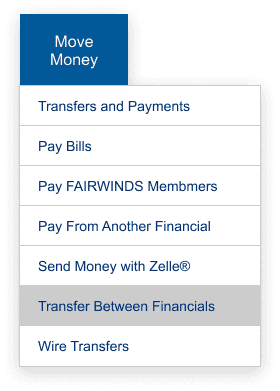
Hover over Move Money from the top menu bar.
Select Transfer Between Financials.
Once selected, you’ll be taken to a screen where you can begin setting up your accounts to transfer funds between financial institutions. You must validate your email address before you can transfer funds.
Select your From and To accounts, enter the amount you would like to send, the send date, and frequency. You also have the option to add a memo.
To add a new account , select the Add a New Account link and input the required information. Note: You must be an owner on the account(s) you are adding.
Verify Your External Accounts
Enter your login credentials for the financial institution where the account(s) are held.
Manually verify two test deposits (combined, the deposits won't exceed $1.00).
FAIRWINDS will deposit and then withdrawal from the account(s) you’re trying to link . It can take up to three business days for the transactions to post . You'll receive an email from [email protected] with instructions for verifying the two small deposits. After completing the required steps, you’ll receive a confirmation email or next steps if additional verification is needed.