Change It Up Guide
Change It Up is an easy way to grow your savings effortlessly! We’ll automatically round up any debit card purchases you make to the nearest dollar, with the difference deposited directly to build your savings or pay down a loan. You can also round up each debit transaction by additional dollar increments up to $5.00. Change It Up transactions won’t cause you to overdraft, and you can update your enrollment at any time.
How To Enroll on the FAIRWINDS App
Sign in to the FAIRWINDS mobile app.
Once you are on your accounts screen, select the More tab on the bottom right.
Navigate to the Journey to Financial Freedom section.
Select Change It Up.
Choose which savings account or loan you’d like your Change It Up difference deposited into. Plus, add any additional dollar amount you’d like to round up (Additional Amount drop down). Any eligible checking accounts will be listed and available to enroll.
Review and accept the Terms and Conditions.
Select Submit.
How To Enroll Online
Sign in to your FAIRWINDS account online.
Hover over Journey to Financial Freedom in the top menu bar.
Select Change It Up.
Choose which savings account or loan you’d like your Change It Up
difference deposited into. Plus, add any additional dollar amount you’d like to round up (Additional Amount drop down). Any eligible checking accounts will be listed and available to enroll.
Review and accept the Terms and Conditions.
Select Submit.
How To Enroll Online
Sign in to your FAIRWINDS account online.
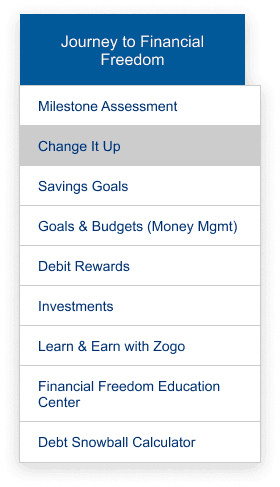
Hover over Journey to Financial Freedom in the top menu bar.
Select Change It Up.
Choose which savings account or loan you’d like your Change It Up
difference deposited into. Plus, add any additional dollar amount you’d like to round up (Additional Amount drop down). Any eligible checking accounts will be listed and available to enroll.
Review and accept the Terms and Conditions.
Select Submit.